Prompt TemplatesGenreAI VideoTutorial

AI Video Prompt Templates by Genre: Horror, Romance, Sci-Fi, Documentary, and Promo

October 5, 2026
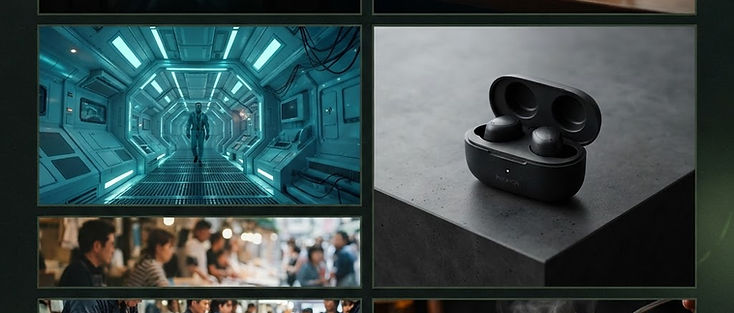
Grid of genre mood frames illustrating AI video prompt templates

AI Video Prompt Templates by Genre: Horror, Romance, Sci-Fi, Documentary, and Promo

A blank prompt box invites vague adjectives and wasted credits. Genre templates fix that by locking the parts that create mood—light, camera attitude, and atmosphere—while you swap the subject. This guide gives you copy-ready skeletons for five genres plus food, plus a short method for adapting them without collapsing the look. It sits alongside the blog’s cinematic AI video prompts collection and the broader text-to-video workflow.

In Avocadio you can paste these into Text to Video, start from a starter prompt and genre-tune it, or pair a still with Image to Video when identity matters. Save keepers in history so your personal template library grows shot by shot.

Create this in Avocadio — Paste a genre skeleton, swap in your subject, generate a short cinematic clip, and keep the winner in history. Try Avocadio

The universal skeleton

Use this order every time:

“Subject with one concrete detail, one action, one camera move, light and time of day, atmosphere, cinematic style.”

Rules that keep templates reliable:

  • One primary subject (a hallway, two cups, a product, a corridor)—not a crowd unless the crowd is the point.
  • One camera verb (push-in, orbit, drift, static with subtle parallax). Competing moves muddy the result.
  • Light does most of the genre work. Horror without hard shadows still looks like a hallway; romance without warm practicals still looks like a window ledge.

If a take fails, change one module only. Diagnose with the lighting for AI video checklist before you rewrite the whole sentence.

Horror template

Skeleton: “Ordinary space at night, one subtle wrong detail, slow push-in, hard side key light, deep shadows, almost no fill, cinematic horror tension.”

Filled example: “Empty motel hallway with a flickering exit sign, slow push-in toward the last door, hard side light, deep blacks, quiet cinematic dread.”

Why it works: the ordinary space lowers the viewer’s guard; the wrong detail (flicker, ajar door, wrong reflection) creates unease; removing fill keeps contrast. Common mistake: stacking jump-scare props in one prompt. One wrong detail beats five.

Variation for object horror: “Child’s music box on a dusty dresser, lid slowly opening, static camera with slight creep forward, single practical lamp, hard falloff, cinematic unease.”

Romance / warm drama template

Skeleton: “Intimate detail or soft silhouette, gentle camera drift, warm practical lights, soft haze, shallow depth of field, cinematic romance.”

Filled example: “Two coffee cups on a rainy window ledge, soft condensation trails, slow lateral drift, warm café practical light, intimate cinematic mood.”

Why it works: small scale reads clearly on phones; warm practicals signal intimacy; drift feels unhurried. Common mistake: wide establishing shots of entire city skylines—romance collapses into travel B-roll. Keep the frame close.

Variation: “Hands exchanging a house key on a wooden porch, golden hour sidelight, gentle push-in, soft haze, tender cinematic tone.”

Sci-fi template

Skeleton: “Futuristic interior or object, slow orbit or measured push-in, cool rim light, clean reflections, light volumetric haze, cinematic sci-fi.”

Filled example: “Minimal spacecraft corridor with cool cyan rim light, slow push-in down the center line, soft haze, precise reflective floors, cinematic sci-fi.”

Why it works: cool rim plus reflections sell “future” faster than naming fictional brands. Common mistake: overcrowding the prompt with UI panels and alien languages—letterforms warp. Describe light and materials, not readable screens.

Variation: “Desk-sized prototype device with a soft pulsing glow, slow orbit, cool rim and dim warm bounce, clean lab aesthetic, cinematic tech demo.”

Documentary / observational template

Skeleton: “Real-world location type, gentle handheld feel, natural available light, restrained motion, observational documentary cinema.”

Filled example: “Morning fish market aisle, gentle handheld feel, natural window light from the left, people moving through soft focus background, observational documentary cinema.”

Why it works: available light and restrained motion feel honest. Common mistake: adding “epic drone” language—that flips the genre into travel promo. Stay eye-level and patient.


Production note

Create this in Avocadio

Turn these techniques into a finished short film. Avocadio turns prompts into cinematic AI video — no editing suite required.

Try Avocadio

Variation: “Neighborhood barber shop mid-afternoon, static frame with subtle life in the mirrors, fluorescent mixed with window light, quiet documentary tone.”

Promo / product template

Skeleton: “Product centered on a clean surface or seamless, slow push-in or soft orbit, soft studio key with gentle shimmer, premium promo style.”

Filled example: “Matte black wireless earbuds in an open charging case on seamless gray, slow push-in, soft studio key, subtle specular shimmer, premium product promo.”

Pair this with a real packshot via Image to Video when logo edges must stay faithful.

Common mistake: asking for flying confetti, lens flares, and price tags in the same generate. Motion should sell the object, not the VFX reel.

Food (bonus) template

Skeleton: “Hero dish with one appetizing action, steam or drizzle visible, warm key light, shallow depth, food commercial cinematic.”

Filled example: “Fresh pasta with slow cheese pull, gentle steam, warm kitchen key light from camera left, shallow depth, food commercial cinematic.”

Food fails when the prompt lists five garnishes and no action. One verb—drizzle, steam, sear, pour—carries the clip.

How to customize without breaking the genre

  1. Paste the skeleton unchanged.
  2. Replace only the subject noun phrase.
  3. Generate once. Watch muted on a phone.
  4. If mood is wrong, adjust light words only (warmer, harder side key, less fill).
  5. If composition is wrong, adjust camera or centering words only.
  6. Save the keeper to history with a note like “horror-hallway-v2” so you can reuse it.

Starter prompts inside Avocadio are useful scaffolding: take the base direction, then overwrite the subject line with your genre-filled example. Do not stack a starter and a full custom paragraph that fight each other.

Genre mashups (use sparingly)

“Documentary sci-fi” can work if you pick one dominant light language—for example, observational framing plus cool practical LEDs, not handheld frenzy plus glossy commercial orbit at once. “Romantic horror” works when warmth sits in practicals while shadows stay deep. Mashups fail when two camera personalities compete in one sentence.

For short-form delivery after you have genre beats, assemble in an editor using the edit AI clips into a short film approach, or shape vertical cuts with the cinematic shorts for Reels and TikTok playbook.

Create this in Avocadio — Open Text to Video, paste one filled example above, generate, then tweak a single module on the next credit. Try Avocadio

Common mistakes checklist

  • Writing novels: if the prompt is longer than three short sentences, cut atmosphere adjectives first.
  • Naming celebrities or copyrighted film titles as style anchors you do not have rights to imply.
  • Forcing readable on-screen text inside the generate—add titles in your editor.
  • Changing subject, light, and camera after every miss—you learn nothing.
  • Ignoring history: regenerating from memory instead of the exact prompt that almost worked.

FAQ

Are templates enough on their own? They are starting points. After each generate, diagnose whether subject, motion, or light failed, then change only that module.

Can I use these with Image to Video? Yes. Keep the genre lighting language in the motion brief, and ask for restrained movement so the still’s identity holds.

Where should I assemble multi-beat genre stories? Generate separate beats, then cut them in an editor. See edit AI clips into a short film.

How do starter prompts fit? Use a starter for pace and camera energy, then replace its subject with your genre-specific noun phrase so the clip is yours.

Bottom line

Genre is mostly lighting plus camera attitude. Lock those, swap subjects, and build a dated library in history. When you want a clean loop from prompt to preview, open Avocadio and keep an editor for titles and sound.

Related: Cinematic AI video prompts · Lighting for AI video · How to turn text into video with AI

Production note

Create this in Avocadio

Turn these techniques into a finished short film. Avocadio turns prompts into cinematic AI video — no editing suite required.

Try Avocadio

Related articles