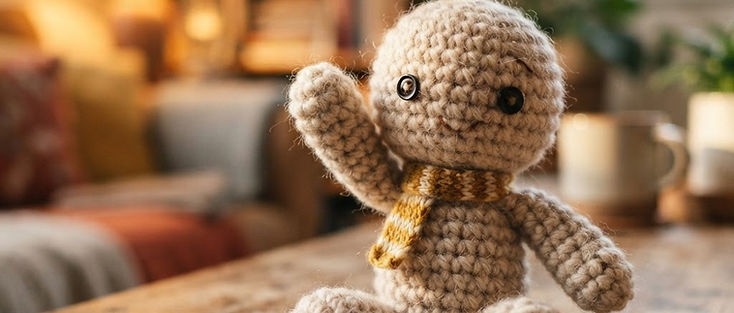
One of the AI video formats spreading on TikTok and Reels this October is the crochet look: a person, a pet or a character is turned into a small handmade crochet doll, with visible yarn stitches, button-like eyes and soft, slightly wobbly movement. Most people make it from one photo through app templates.
This is our weekly viral AI video breakdown. We describe the trend in general terms (we do not copy or embed anyone's clip), explain why it works, and give you copy-ready AI video prompt ideas to make your own version in Avocadio with Text to Video or Image to Video.
What the trend looks like
The clips share a few simple traits:
- Subject: one character rebuilt as a crochet or knitted doll. Round head, chunky yarn texture, tiny limbs.
- Setting: cozy and small. A wooden table, a craft desk, a shelf, a bed with a blanket.
- Motion: gentle and a little clumsy, like stop-motion. A wave, a nod, a small hop, a turn of the head.
- Light: warm and soft, like a lamp in a living room.
- Length: a few seconds, often looping.
Why it works
- It is instantly recognizable and still surprising. Everyone knows what yarn looks like. Seeing a familiar face or pet made of it creates a quick "wait, that's me" moment, and that moment is the hook.
- It feels handmade. Viewers have seen a lot of glossy, hyper-real AI video. A soft, imperfect craft texture stands out in the feed because it looks warm instead of polished.
- It is safe and shareable. The look is cute, not uncanny. People send it to friends and family, which helps it spread outside the usual AI video crowd.
- It is a template. Swap the subject and you have a new post: your dog, your partner, your mascot, your product. Templates spread because anyone can make their own version.
- It plays to what AI video does well. One small subject, a simple background, slow movement and a strong texture are much easier for a generator than a busy scene. Stop-motion style also hides small motion glitches, because a little jitter looks intentional.
The recipe in one line
Crochet or knitted subject + cozy small-scale setting + slow stop-motion movement + warm soft light + close-up framing.
Keep that structure and change everything else.
Copy-ready prompts (Text to Video)
Paste these as they are, or swap the bracketed parts.
The classic crochet self-portrait
"Close-up of a small handmade crochet doll of a [young woman with long dark hair and a green sweater], visible yarn stitches, black button eyes, sitting on a wooden table, she waves at the camera and tilts her head, stop-motion style movement, warm lamp light, shallow depth of field, cozy living room background softly blurred, vertical 9:16."
Crochet pet
"A chunky crochet version of a [golden retriever] made of soft yellow yarn, stitched nose and felt ears, sitting on a knitted blanket, wagging its tail and tilting its head, gentle stop-motion animation, warm afternoon window light, macro lens, cozy and cute, vertical framing."
Crochet couple
"Two small crochet dolls, a man and a woman in matching knitted scarves, standing on a wooden shelf next to a tiny potted plant, they turn to each other and hold hands, slow stop-motion movement, warm golden light, soft background blur, handmade craft aesthetic."
Crochet cafe scene
"A tiny crochet barista doll with an apron made of yarn stands behind a miniature knitted coffee counter, pours a small yarn coffee cup and slides it forward, stop-motion animation, warm cafe lighting, close-up, visible stitch texture, cozy tone."
Crochet adventure
"A small crochet explorer doll with a tiny yarn backpack walks across a landscape made of knitted green hills and felt trees, a crochet sun in the sky, slow stop-motion walk cycle, soft daylight, tilt-shift miniature look, wide shot, playful mood."
Crochet product mascot
"A crochet version of a [smiling avocado mascot] made of green and brown yarn, button eyes, sitting on a white desk, it waves and gives a small hop, stop-motion style, soft studio light, clean minimal background, close-up, vertical 9:16."
Make it from a photo (Image to Video)
Image to Video animates the photo you upload, so the easiest route is to start from a picture that already has the crochet look, for example a real crochet toy, a craft you made, or a still image of a crochet character. Then add a motion prompt like: